

What is Claude Managed Agents?
Claude Managed Agents is Anthropic’s fully managed agent harness, currently in beta. Instead of building your own agent loop, tool execution layer, and runtime infrastructure, you get a managed environment where Claude runs autonomously: reading files, executing bash commands, browsing the web, and calling external tools via MCP. You define the agent once (model, system prompt, tools, MCP servers), create an environment (a cloud sandbox or your own infrastructure), and start sessions via API. Claude works through the task, streams events back in real time, and you can steer or interrupt mid-execution.Why connect ZenRows to Claude Managed Agents?
- Get past bot protection the built-in fetch can’t bypass. Managed Agents has a native web fetch tool, but it won’t get through site protections. ZenRows handles anti-bot evasion so the agent fetches the actual page every time.
- Cleaner output for token-heavy sessions. ZenRows returns structured Markdown instead of raw HTML. In long-running sessions with many tool calls, this keeps token usage lean and the model focused on what matters.
- Interact with dynamic pages without writing scraping code. Some sites only surface their data after scrolling, clicking through paginated results, selecting dropdown filters, or waiting for JavaScript to render. ZenRows’ browser tools handle all of that. The agent describes the interaction in plain English, and ZenRows executes it.
What you can build
- Autonomous competitive intelligence reports. Kick off a session that scrapes competitor pricing, product pages, and job boards across multiple sites, synthesizes findings, and writes a structured report to a file in the sandbox, all while you do other work.
- Long-running data extraction pipelines. Send the agent a list of URLs and instruct it to scrape each one, extract specific fields, and write structured output to a CSV. The session runs asynchronously and streams progress events as each page completes.
- Research workflows with live web access. Give the agent a research brief and let it autonomously decide which pages to visit, what to extract, and how to synthesize findings, using ZenRows to reliably fetch any source regardless of protection.
- Scheduled monitoring via webhooks. Combine sessions with Managed Agents’ webhook support to build monitoring workflows that trigger on a schedule, scrape target pages via ZenRows, and push results to your system when done.
Prerequisites
- A Claude API key from the Anthropic Console.
- Access to Claude Managed Agents (enabled by default for all API accounts).
- A ZenRows API key from the ZenRows dashboard.
Getting started
Add your ZenRows API key to a Credential vault
Sign in to your Anthropic Console dashboard, navigate to Managed Agents in the left sidebar, and click Credential vaults.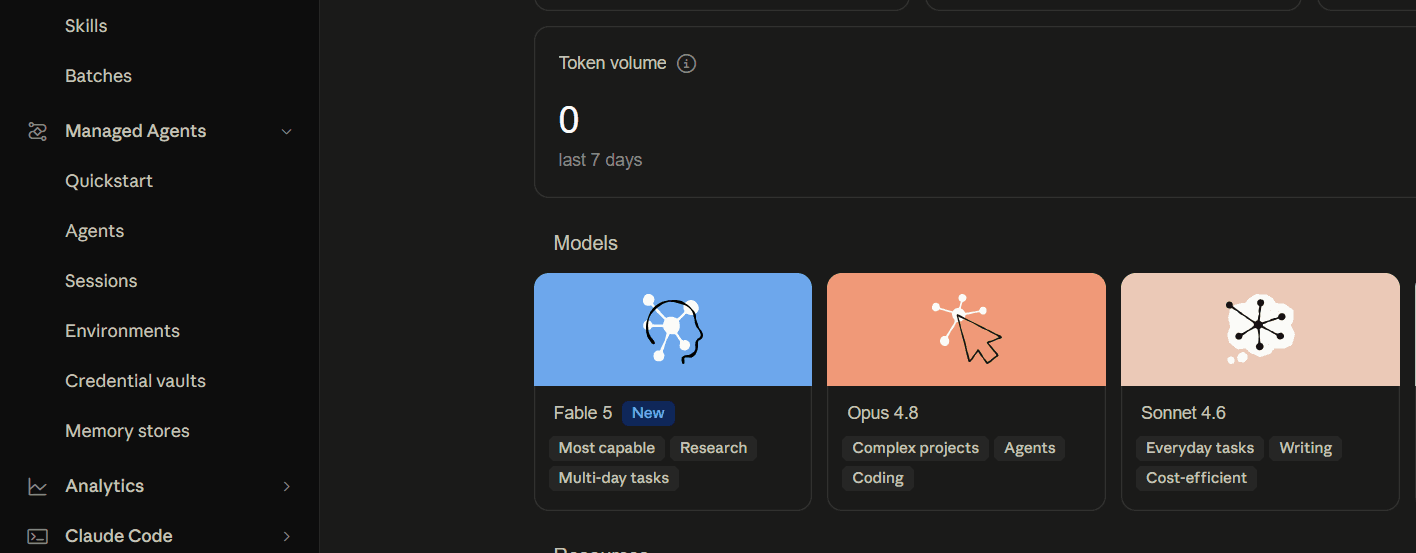 Follow the on-screen instructions to create your vault:
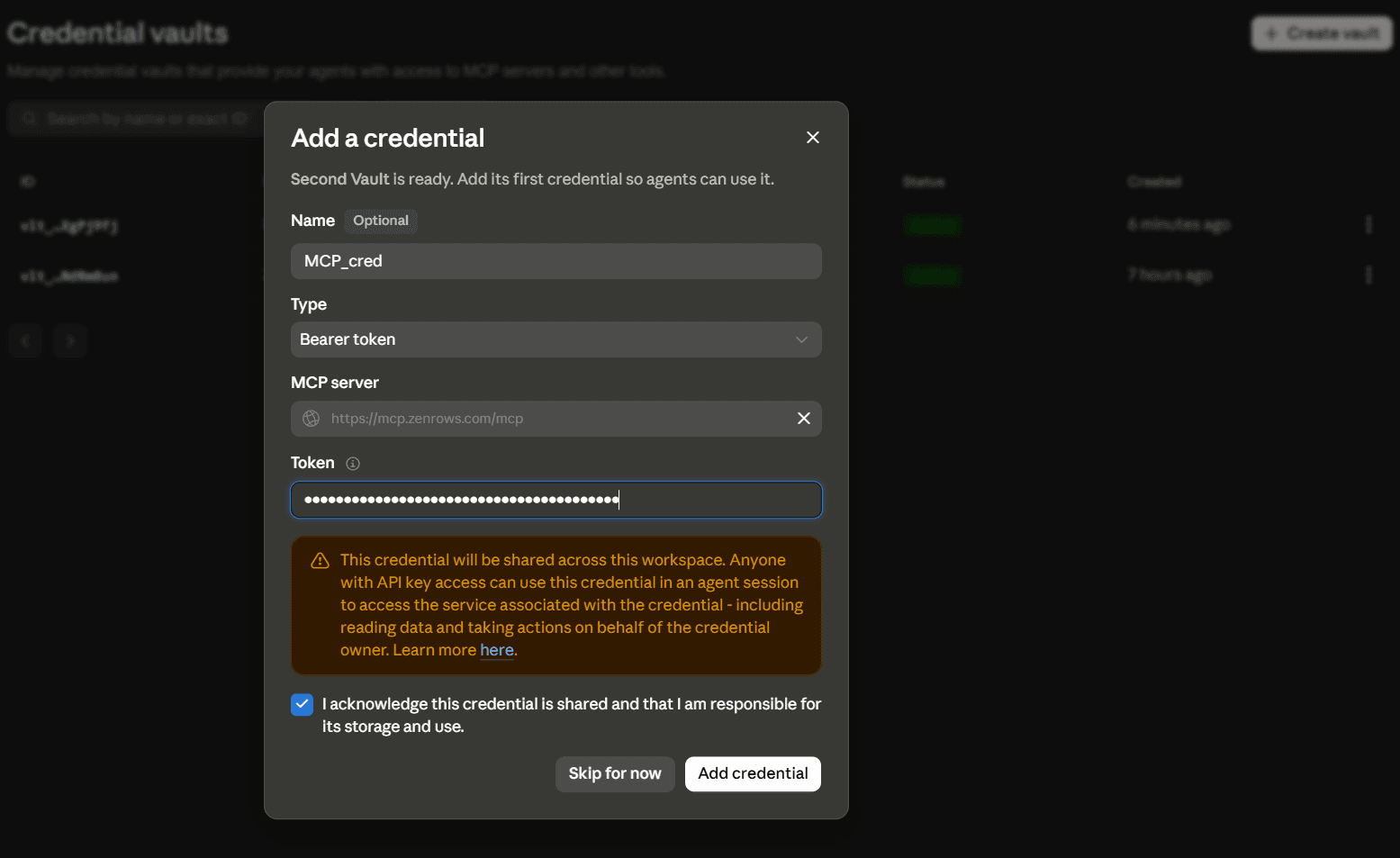 Anthropic matches credentials to MCP servers by URL at session time. As long as the URL in your vault matches the URL in the agent definition, the key is injected automatically and doesn’t need to appear in the agent config.Copy and save the vault ID. You’ll need it when starting sessions via Anthropic’s SDK or CLI.
Follow the on-screen instructions to create your vault:- Name your vault.
- Set the Type to Bearer token.
- Paste the following ZenRows MCP connection URL as a Custom Server in the MCP server field:
- Paste your ZenRows API key in the Token field.
- Acknowledge credential sharing and click Add credential.
Anthropic matches credentials to MCP servers by URL at session time. As long as the URL in your vault matches the URL in the agent definition, the key is injected automatically and doesn’t need to appear in the agent config.Copy and save the vault ID. You’ll need it when starting sessions via Anthropic’s SDK or CLI.Create the agent
Go to Agents and click New agent. Switch to the JSON tab and paste the following:You can freely modify:
JSON
nameanddescriptionto match your use casemodelto any supported Claude modelsystemto tailor the agent’s behavior and tone
mcp_servers block. The name and url fields must stay exactly as shown above so the vault credential you created in Step 1 can be matched and injected automatically. Any change to the URL will break the connection.always_allow removes the approval gate so ZenRows tools execute automatically. The default is always_ask, which pauses the session before every tool call.Click Create agent to save the agent, then copy and store the agent ID from the Console.Create your environment
Go to Environments in the Console sidebar. If no environment exists yet, click New environment, name it, and save it. Then click Edit at the top-right of the environment, set Type to Unrestricted, and click Save changes.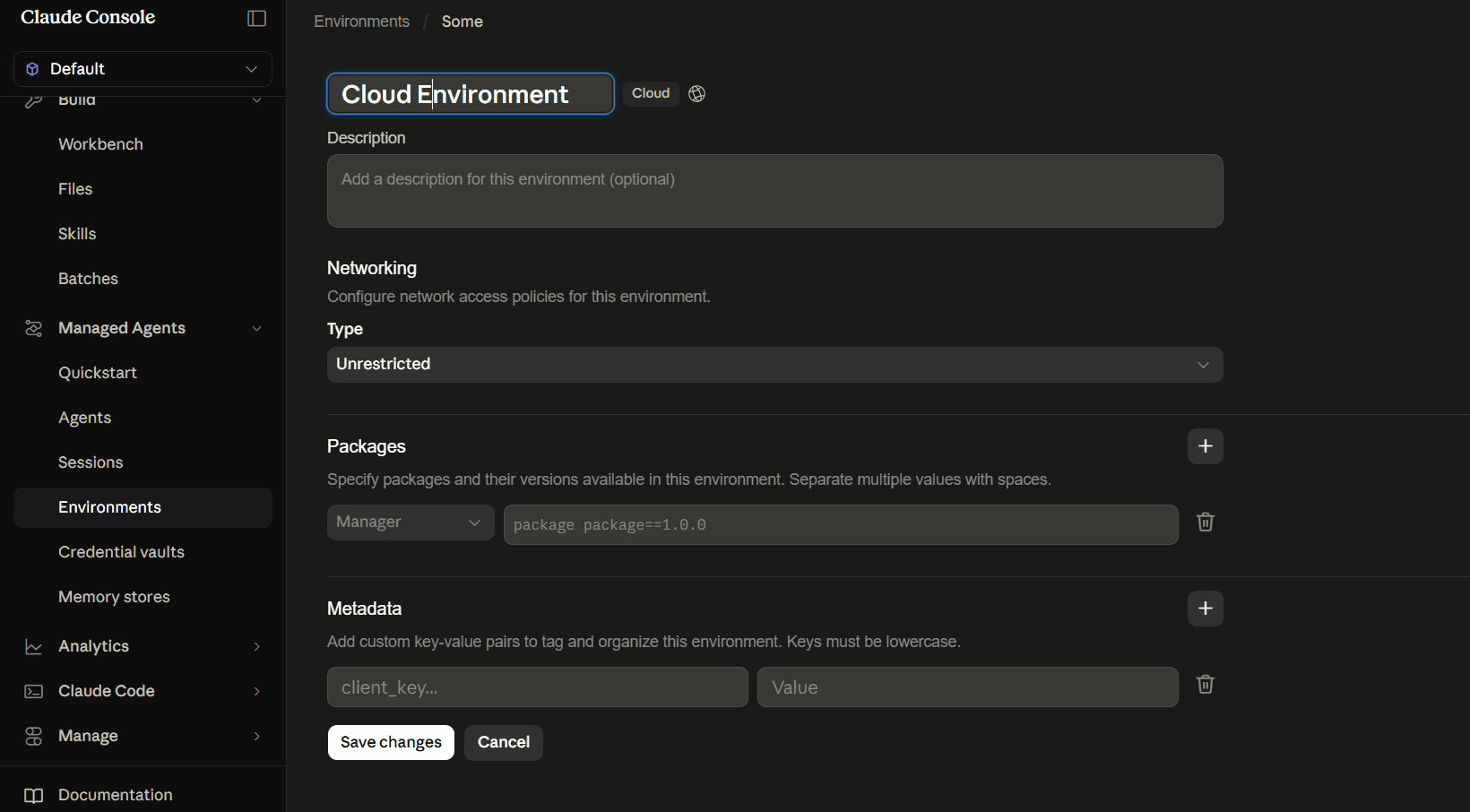 This allows the sandbox to reach the ZenRows MCP server at Copy the environment ID. Environments are reusable across sessions and agents. Each session gets its own isolated sandbox, but the environment configuration is shared.
This allows the sandbox to reach the ZenRows MCP server at mcp.zenrows.com without any additional host configuration.Without this setting, you’ll see this error when starting a session:Test in the Console UI
Before moving to code, confirm ZenRows is connected and working directly in the Console.Go to Sessions in the left sidebar and click New session. Select your agent and environment, then send a prompt in the message field:In the session transcript, you’ll see:Once the session returns a clean summary, your integration is working. Copy your Vault ID from Credential vaults, then start sessions via the SDK or CLI.
- Each ZenRows tool call listed inline as it executes.
- The tool’s parameters on the right panel, showing which options ZenRows used.
- The agent’s final response once the session goes idle.
Example output
Start an agent session via SDK
With your agent ID, environment ID, and vault ID in hand, start a session and send a prompt programmatically. This guide uses the Python SDK. SDKs are also available for TypeScript, Go, Java, C#, PHP, and Ruby. You can also use the Create a Then run the session:
ant CLI for the same. See the Claude API official docs for CLI examples.Install the SDK:.env file in your project root:.env
Troubleshooting
httpx.ReadError: An existing connection was forcibly closed
The streaming connection dropped mid-response due to network instability. The session itself completed successfully on Anthropic’s side. Try on a more stable connection, or disable any VPN, firewall, or antivirus that may be cutting long-lived HTTP connections.MCP server host(s) blocked by environment network policy
Your environment’s networking policy is blocking outbound access tomcp.zenrows.com. Go to Environments in the Console, open your environment, click Edit, and set the networking Type to Unrestricted. Save the environment and restart your session.
mcp_authentication_failed_error in session events
The vault credential URL doesn’t match theurl declared in mcp_servers. Both must be exactly https://mcp.zenrows.com/mcp. Check for trailing slashes or typos in either field.
mcp_connection_failed_error in session events
The ZenRows MCP server was unreachable. The session continues without ZenRows tools. Check your network settings and confirm the endpoint is reachable. The connection is retried automatically on the next session interaction.Session starts but agent doesn’t call ZenRows tools
Confirm that themcp_toolset entry references mcp_server_name: zenrows and that zenrows matches the name in your mcp_servers array exactly. A mismatch means the toolset is declared but not linked to any server.
Agent pauses before every ZenRows tool call
The MCP toolset defaults toalways_ask, which pauses the session and waits for your approval before each tool call. Set always_allow on the toolset to let ZenRows tools execute automatically:
JSON
Tools.1.permission_policy: Extra inputs are not permitted
Thepermission_policy field must be nested inside default_config, not placed directly on the toolset object. See the correct structure above.
Missing beta header error
All Managed Agents requests requiremanaged-agents-2026-04-01 in the beta header. The Python and TypeScript SDKs accept this via the betas parameter on each call. If you’re using raw HTTP, add anthropic-beta: managed-agents-2026-04-01 to every request header.
Further reading
- Claude Managed Agents overview
- MCP connector
- Authenticate with vaults
- Session event stream
- ZenRows MCP documentation
FAQ (Frequently asked questions)
Can I reuse the same environment across different agents?
Can I reuse the same environment across different agents?
Yes. Environments are created independently of agents and referenced by ID at session creation. Multiple sessions from different agents can all reference the same environment configuration. Each session still gets its own isolated sandbox (sessions do not share filesystem state), but the environment definition (networking, pre-installed packages, sandbox type) is shared.
Is Claude Managed Agents generally available?
Is Claude Managed Agents generally available?
It’s currently in beta. All requests require the
managed-agents-2026-04-01 beta header. See the overview for current access details.Why store the ZenRows API key in a vault rather than in the agent definition?
Why store the ZenRows API key in a vault rather than in the agent definition?
Agent definitions are reusable and workspace-scoped. Putting credentials there would expose them to anyone with API access to the workspace. Vaults keep secrets separate: the agent definition stays clean, and each session injects the right credential at runtime.
Can I use ZenRows in multiagent sessions?
Can I use ZenRows in multiagent sessions?
Yes. Vault credentials apply to every thread in a multiagent session. Any agent whose definition declares the ZenRows MCP server will authenticate with the vault credentials provided at session creation. See Multiagent sessions.
Can I restrict which ZenRows tools the agent can use?
Can I restrict which ZenRows tools the agent can use?
Yes. Use the
default_config and configs pattern on the mcp_toolset entry. Set default_config.enabled to false and explicitly enable only the tools you want:JSON
What are the costs involved in running a ZenRows-powered Managed Agents session?
What are the costs involved in running a ZenRows-powered Managed Agents session?
Connecting ZenRows via MCP is free. However, there are two separate costs from running an agent that calls the ZenRows MCP. Anthropic bills for the session itself based on token usage across all model calls. ZenRows bills separately against your subscription for each tool call:
scrape calls use Universal Scraper API credits and browser_* calls use Scraping Browser credits. Monitor ZenRows usage on your ZenRows Analytics page.Can I run sessions on my own infrastructure instead of Anthropic's cloud?
Can I run sessions on my own infrastructure instead of Anthropic's cloud?
Yes. Claude Managed Agents supports self-hosted sandboxes to meet compliance or data residency requirements. The ZenRows MCP setup is identical: ZenRows connects via the remote HTTP server regardless of where the sandbox runs. See Self-hosted sandboxes.