

1. Set Up Your Project
Set Up Your Development Environment
Before diving in, ensure you have the proper development environment and required HTTP client libraries for your preferred programming language. ZenRows works with any language that can make HTTP requests.While previous versions may work, we recommend using the latest stable versions for optimal performance and security.
- Python
- Node.js
- Java
- PHP
- Go
- Ruby
- cURL
Python 3 is recommended, preferably the latest version.
Consider using an IDE like PyCharm or Visual Studio Code with the Python extension.
Get Your API Key
Sign up for a free ZenRows account and get your API key from the Playground dashboard. You’ll need this key to authenticate your requests.2. Make Your First Request
Start with a simple request to understand how ZenRows works. We’ll use the HTTPBin.io/get endpoint to demonstrate how ZenRows processes requests and returns data.YOUR_ZENROWS_API_KEY with your actual API key and run the script:
Expected Output
The script will print the contents of the website, forHTTPBin.io/get it’s something similar to this:
Response
3. Scrape More Complex Websites
Modern websites often use JavaScript to load content dynamically and employ sophisticated anti-bot protection. ZenRows provides powerful features to handle these challenges automatically.Use Adaptive Stealth Mode
The simplest way to scrape complex or protected sites in code is to use Adaptive Stealth Mode (mode=auto). ZenRows analyzes each request and automatically applies the right combination of JavaScript rendering and Premium Proxies only when needed, so you get reliable results without having to tune parameters yourself. Add mode=auto to your request:
mode=auto, only the managed parameters (js_render and premium_proxy) are disabled to prevent conflicts. You can still use other API parameters alongside Adaptive Stealth Mode, such as:
- Proxy country (
proxy_country): For region-restricted or geo-specific content, set the country of the IP (e.g.,proxy_country=us). When a proxy country is set, ZenRows automatically applies Premium Proxies to test the most reliable configuration. If our system detects that another proxy type or country delivers better results for your request, we may switch it automatically to maximize success rates. - JavaScript rendering wait (
waitorwait_for): For slow-loading or dynamic content, addwait(milliseconds after page load) orwait_for(CSS selector). When a wait time is set, ZenRows automatically applies JavaScript rendering on the configuration. - Other parameters:
css_extractor,session_id, custom headers, and other API parameters remain available for use withmode=auto.
Python
Use the Request Playground (easy mode)
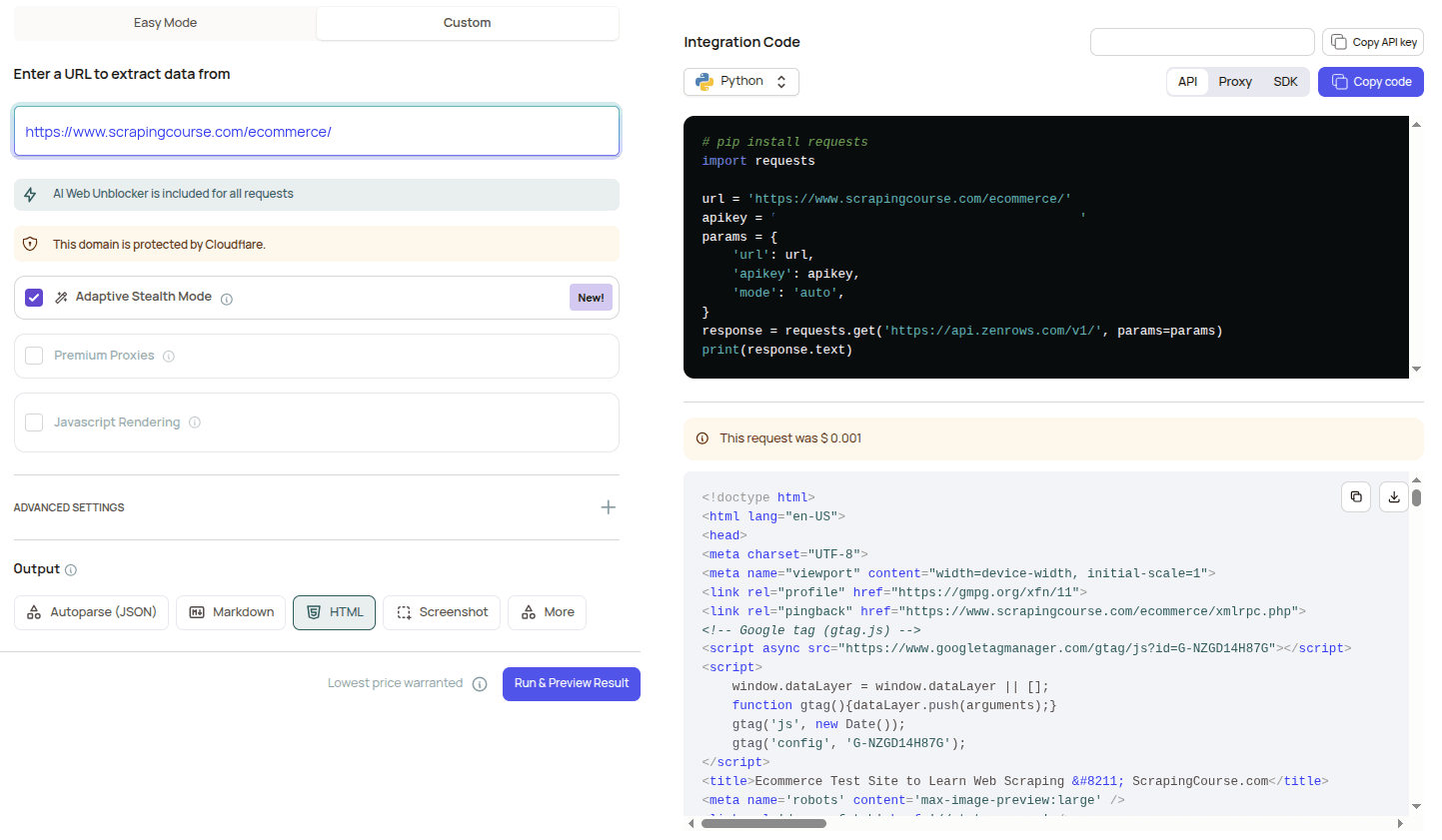
The Request Playground in your ZenRows dashboard offers an easy mode that uses Adaptive Stealth Mode by default. Enter your target URL and run a request. There’s no need to choose JavaScript rendering or Premium Proxies yourself. ZenRows picks the proper configuration for each URL. Benefits:- Test any URL visually and see the result immediately
- Get a ready-to-use cURL command or code snippet with
mode=autoincluded - Reliable results on complex or protected sites without manual parameter tuning
Use the Request Playground (custom mode)
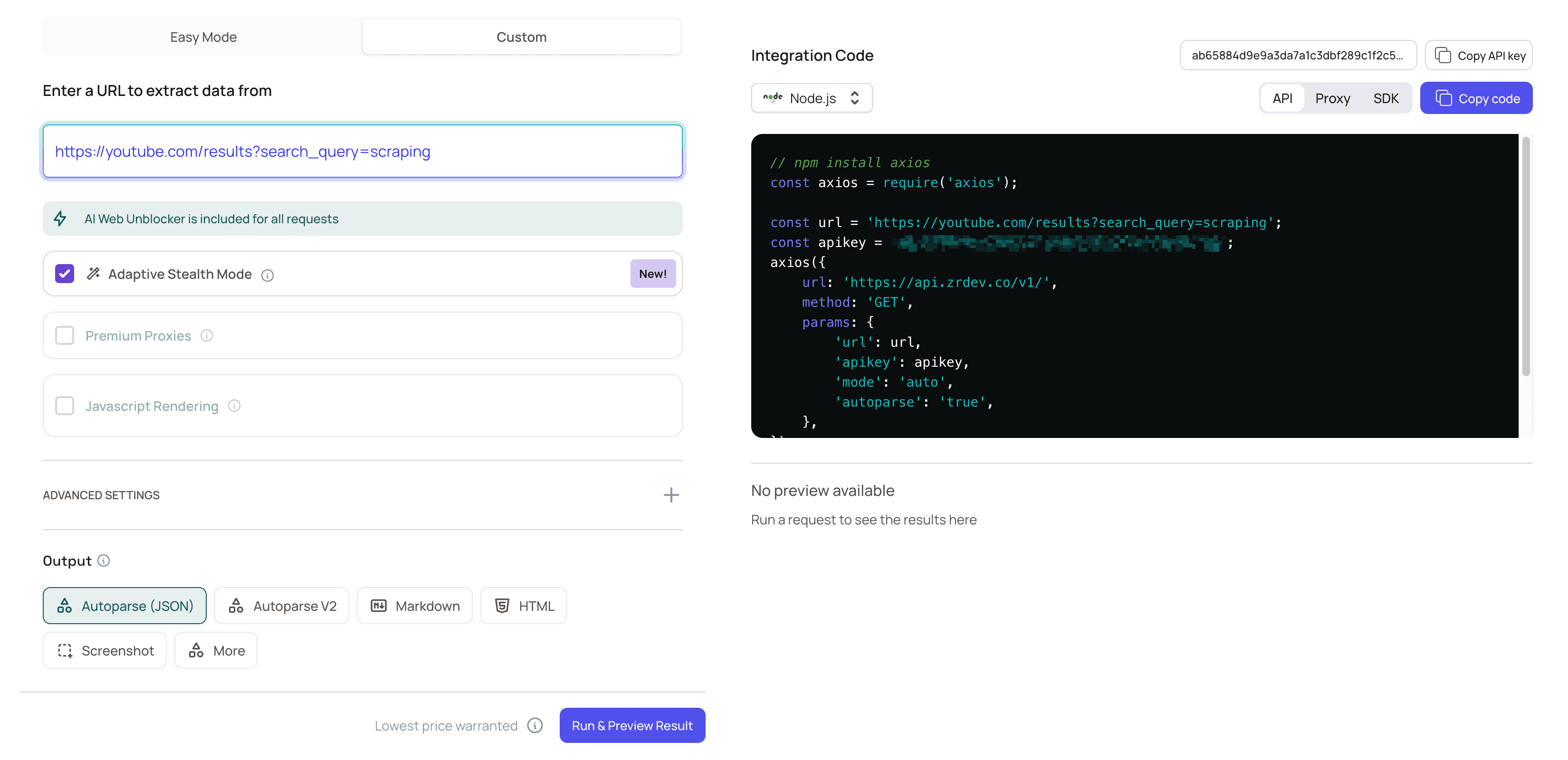
For fine-grained control when you know exactly which features a site needs, use the Request Playground’s custom mode to set parameters yourself. You can manually configure JavaScript rendering, Premium Proxies, and other options, or select Adaptive Stealth Mode (mode=auto) to let ZenRows choose automatically.
Use Premium Proxies
Premium Proxies provide access to over 55 million residential IP addresses from 190+ countries with 99.9% uptime, ensuring the ability to bypass sophisticated anti-bot protection.Enable JavaScript Rendering
JavaScript Rendering uses a real browser to execute JavaScript and capture the fully rendered page. This is essential for modern web applications, single-page applications (SPAs), and sites that load content dynamically.Combine Features for Maximum Success
For the most protected sites, enable both JavaScript Rendering and Premium Proxies. This provides the highest success rate for challenging targets.js_render parameter enables JavaScript processing, while premium_proxy routes your request through residential IP addresses.
Use-case recipes
Here are a few quick recipes you can adapt:- Form submission → Use
js_render+js_instructions. - Keep session across requests → Add
session_idto maintain session state and IP consistency. - Extract structured fields only → Use
css_extractorto return just the fields you need.
See the full Common Use Cases & Recipes guide.
Run Your Application
Execute your script to test the scraping functionality and verify that your setup works correctly.Example Output
Run the script, and ZenRows will handle the heavy lifting by rendering the page’s JavaScript and routing your request through premium residential proxies. The response will contain the entire HTML content of the page:HTML
Troubleshooting
Request failures can happen for various reasons. While some issues can be resolved by adjusting ZenRows parameters, others are beyond your control, such as the target server being temporarily down. Below are some quick troubleshooting steps you can take:Check the Error Code and Error Message
When faced with an error, it’s essential first to check the error code and message for indications of the error. The most common error codes are:
-
401 Unauthorized
Your API key is missing, incorrect, or improperly formatted. Double-check that you are sending the correct API key in your request headers. -
429 Too Many Requests
You have exceeded your concurrency limit. Wait for ongoing requests to finish before sending new ones, or consider upgrading your plan for higher limits. -
413 Content Too Large
The response size exceeds your plan’s limit. Use CSS selectors to extract only the needed data, reducing the response size. -
422 Unprocessable Entity
Your request contains invalid parameter values, or anti-bot protection is blocking access. Review the API documentation to ensure all parameters are correct and supported.
Check if the Site is Publicly Accessible
Some websites may require a session, so verifying if the site can be accessed without logging in is a good idea. Open the target page in an incognito browser to check this.You must handle session management in your requests if authentication credentials are required. You can learn how to scrape a website that requires authentication in our guide: Web scraping with Python.
Verify the Site is Accessible in Your Country
Sometimes, the target site may be region-restricted and only accessible to specific locations. ZenRows automatically selects the best proxy, but if the site is only available in concrete regions, specify a geolocation using If the target site requires access from a specific region, adding the
proxy_country.Here’s how to choose a proxy in the US:proxy_country parameter will help.Add Pauses to Your Request
You can also enhance your request by adding options like
wait or wait_for to ensure the page fully loads before extracting data, improving accuracy.Retry the Request
Network issues or temporary failures can cause your request to fail. Implementing retry logic can solve this by automatically repeating the request.
Get Help From ZenRows Experts
Our support team can assist you if the issue persists despite following these tips. Use the Playground page or contact us via email to get personalized help from ZenRows experts.
Next Steps
You now have a solid foundation for web scraping with ZenRows. Here are some recommended next steps to take your scraping to the next level:- Complete API Reference:
Explore all available parameters and advanced configuration options to customize ZenRows for your specific use cases. - JavaScript Instructions Guide:
Learn how to perform complex page interactions like form submissions, infinite scrolling, and multi-step workflows. - Output Formats and Data Extraction:
Learn advanced data extraction with CSS selectors, output formats including Markdown and PDF conversion, and screenshot configurations. - Pricing and Plans:
Understand how request costs are calculated and choose the plan that best fits your scraping volume and requirements.
Frequently Asked Questions (FAQ)
How can I bypass CloudFlare and other protections?
How can I bypass CloudFlare and other protections?
To successfully bypass CloudFlare or similar security mechanisms, you’ll need to enable both
js_render and premium_proxy in your requests. These features simulate a full browser environment and use high-quality residential proxies to avoid detection.
You can also enhance your request by adding options like wait or wait_for to ensure the page fully loads before extracting data, improving accuracy.How can I ensure my requests don't fail?
How can I ensure my requests don't fail?
You can configure retry logic to handle failed HTTP requests. Learn more in our guide on retrying requests.
How do I extract specific content from a page?
How do I extract specific content from a page?
You can use the
css_extractor parameter to directly extract content from a page using CSS selectors. Find out more in our tutorial on data parsing.Can I integrate ZenRows with Python's Requests and BeautifulSoup?
Can I integrate ZenRows with Python's Requests and BeautifulSoup?
Yes! You can use ZenRows alongside Python Requests and BeautifulSoup for HTML parsing. Learn how in our guide on Python Requests and BeautifulSoup integration.
Can I integrate ZenRows with Node.js and Cheerio?
Can I integrate ZenRows with Node.js and Cheerio?
Yes! You can integrate ZenRows with Node.js and Cheerio for efficient HTML parsing and web scraping. Check out our guide to learn how to combine these tools: Node.js and Cheerio integration.
How can I simulate user interactions on the target page?
How can I simulate user interactions on the target page?
Use the
js_render and js_instructions features to simulate actions such as clicking buttons or filling out forms. Discover more about interacting with web pages in our JavaScript instructions guide.How can I scrape faster using ZenRows?
How can I scrape faster using ZenRows?
You can scrape multiple URLs simultaneously by making concurrent API calls. Check out our guide on using concurrency to boost your scraping speed.